1. 예외처리의 필요성
예제)
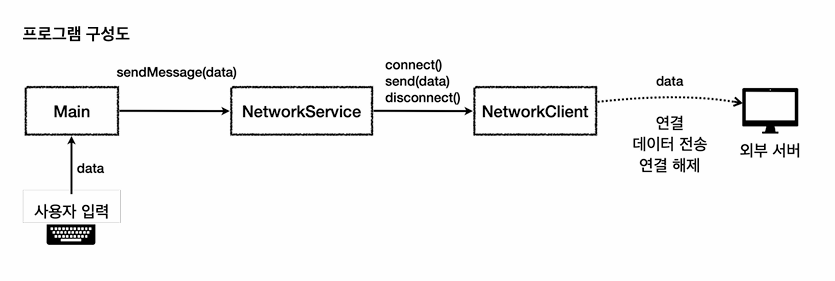
클래스 설명
- NetworkClient
- 외부 서버와 연결하고, 데이터 전송 및 연결 해제등의 기능을 제공
- NetworkService
- NetworkClient를 사용해서 데이터 전송 등 복잡한 흐름을 제어
로직 흐름
- 사용자가 data를 입력하면 NetworkService에서 연결 및 해제, 데이터 전송 등을 담당하고, 클라이언트가 외부서버에 전송
NetworkService
package practice.exception.ex0;

public class NetworkServiceV0 {

    public void sendMessage(String message) {

        String address = "http://example.com";
        NetworkClientV1 client = new NetworkClientV1(address);

        client.connect();
        client.send(message);
        client.disconnect();

    }

}
NetworkClient
package practice.exception.ex0;

public class NetworkClientV1 {

    private final String address;


    public NetworkClientV1(String address) {
        this.address = address;
    }

    public String connect() {
        // 연결 성공
        System.out.println(address + " 서버 연결 성공");
        return address;
    }

    public String send(String data) {
        // 전송 성공
        System.out.println(address + " 서버에 데이터 전송: " + data);
        return "success";
    }

    public void disconnect() {
        System.out.println(address + " 서버 연결 해제");
    }
}
MainV0
package practice.exception.ex0;

import java.util.Scanner;

public class MainV0 {


    public static void main(String[] args) {
        NetworkServiceV0 networkService = new NetworkServiceV0();

        Scanner scanner = new Scanner(System.in);

        while (true) {
            System.out.print("전송할 문자: ");
            String input = scanner.nextLine();

            if (input.equals("exit")) {
                break;
            }
            networkService.sendMessage(input);
            System.out.println();
        }

        System.out.println("프로그램을 정상 종료합니다.");

    }
}
실행 결과
전송할 문자: hello
 http://example.com 서버 연결 성공
http://example.com 서버에 데이터 전송: hello
 http://example.com 서버 연결 해제
전송할 문자: exit
프로그램을 정상 종료합니다
2. 예외처리 필요성2 - 오류 상황
오류 상황
- 연결 실패
- "error1"이란 단어가 있으면 연결 실패, 오류 코드 "connectError"
- 전송 실패
- "error2"이란 단어가 있으면 연결 실패, 오류 코드 "sendError"
NetworkServiceV1_1
package practice.exception.ex1;

import practice.exception.ex1.NetworkClientV1;

public class NetworkServiceV1_1 {

    public void sendMessage(String message) {

        String address = "http://example.com";
        NetworkClientV1 client = new NetworkClientV1(address);


        client.initError(message);

        client.connect();
        client.send(message);

        client.disconnect();

    }

}
NetworkClient
package practice.exception.ex1;

public class NetworkClientV1 {

    private final String address;

    public boolean connectError;
    public boolean sendError;


    public NetworkClientV1(String address) {
        this.address = address;
    }

    public String connect() {

        if (connectError) {
            System.out.println(address + " 서버 연결 실패");
            return "connectError";
        }

        // 연결 성공
        System.out.println(address + " 서버 연결 성공");
        return "success";
    }

    public String send(String data) {

        if (sendError) {

            System.out.println(address + " 서버에 데이터 전송 실패: " + data);
            return "sendError";
        }

        // 전송 성공
        System.out.println(address + " 서버에 데이터 전송: " + data);
        return "success";
    }

    public void disconnect() {
        System.out.println(address + " 서버 연결 해제");
    }


    public void initError(String data) {
        if (data.contains("error1")) {
            connectError = true;
        }

        if (data.contains("error2")) {
            sendError = true;
        }
    }
}
MainV1
package practice.exception.ex1;


import java.util.Scanner;

public class MainV1 {


    public static void main(String[] args) {
        NetworkServiceV1_1 networkService = new NetworkServiceV1_1();

        Scanner scanner = new Scanner(System.in);

        while (true) {
            System.out.print("전송할 문자: ");
            String input = scanner.nextLine();

            if (input.equals("exit")) {
                break;
            }
            networkService.sendMessage(input);
            System.out.println();
        }

        System.out.println("프로그램을 정상 종료합니다.");

    }
}
실행 결과
http://example.com 서버 연결 성공
http://example.com 서버에 데이터 전송: hello
 http://example.com 서버 연결 해제
전송할 문자: error1
 http://example.com 서버 연결 실패
http://example.com 서버에 데이터 전송: error1
 http://example.com 서버 연결 해제
전송할 문자: error2
 http://example.com 서버 연결 성공
http://example.com 서버에 데이터 전송 실패: error2
 http://example.com 서버 연결 해제
전송할 문자: exit
프로그램을 정상 종료합니다.- 위 로직에서는 예외처리를 하지만 연결 실패 시에도 데이터가 전송된다.
- 다음 코드는 예외처리 시 연결에 실패하면 데이터 전송을 안하고 연결해제, 데이터 전송 실패 시 연결해제등을 추가하여
리팩토링하였다.
NetworkServiceV1_3
package practice.exception.ex1;

public class NetworkServiceV1_3 {

    public void sendMessage(String message) {

        String address = "http://example.com";
        NetworkClientV1 client = new NetworkClientV1(address);


        client.initError(message);

        String connectResult = client.connect();

        // 결과가 성공이 아니다 -> 오류
        if (isError(connectResult)) {
            System.out.println("[네트워크 오류 발생] 오류 코드 : " + connectResult);

        } else{

            String sendResult = client.send(message);
            if (isError(sendResult)) {
                System.out.println("[네트워크 오류 발생] 오류 코드 : " + sendResult);
            }
        }

        client.disconnect();

    }

    private static boolean isError(String connectResult) {
        return !connectResult.equals("success");
    }

}
MainV3
package practice.exception.ex1;


import java.util.Scanner;

public class MainV3 {


    public static void main(String[] args) {
        NetworkServiceV1_3 networkService = new NetworkServiceV1_3();

        Scanner scanner = new Scanner(System.in);

        while (true) {
            System.out.print("전송할 문자: ");
            String input = scanner.nextLine();

            if (input.equals("exit")) {
                break;
            }
            networkService.sendMessage(input);
            System.out.println();
        }

        System.out.println("프로그램을 정상 종료합니다.");

    }
}
실행 결과
전송할 문자: hello
http://example.com 서버 연결 성공
http://example.com 서버에 데이터 전송: hello
http://example.com 서버 연결 해제

전송할 문자: error1
http://example.com 서버 연결 실패
[네트워크 오류 발생] 오류 코드 : connectError
http://example.com 서버 연결 해제

전송할 문자: error2
http://example.com 서버 연결 성공
http://example.com 서버에 데이터 전송 실패: error2
[네트워크 오류 발생] 오류 코드 : sendError
http://example.com 서버 연결 해제

전송할 문자: exit
프로그램을 정상 종료합니다.- 하지만 아직도 문제가 있다. 위의 로직은 정상흐름과 예외흐름이 분리가 되어있지않다.
이런 문제를 해결하기 위해 바로 예외 처리 메커니즘이 존재. - 다음 글에서 예외 계층 및 정상흐름과 예외 흐름을 분리하는 방법을 작성
출처 : 김영한 자바 중급 1편
'Java' 카테고리의 다른 글
| Java 중급 1 - 예외처리(3) (0) | 2025.05.05 |
|---|---|
| Java 중급 1 - 예외처리(2) (0) | 2025.05.04 |
| Java 중급 1 - 중첩클래스, 내부 클래스(4) (0) | 2025.04.21 |
| Java 중급 1 - 중첩클래스, 내부 클래스(3) (0) | 2025.04.16 |
| Java 중급 1 - 중첩클래스, 내부 클래스(2) (0) | 2025.04.13 |

